Everything it does
Seven groups, 56 things the shipped product does today, each named with the lane that built it. 5 of the 14 feature loops play on the front page; the rest play here. Nothing on this page is planned — if it is here, it is in the app.
01
Write the mathematics
Natural notation in a live field, evaluated top to bottom by a symbolic engine with the units carried through every operation.
- Natural notation
- Type ≔ and the field becomes a definition. Fractions, roots, subscripts and Greek as you would write them; = evaluates in place.
- CC-P2c
- Units are load-bearing
- Every value is a quantity. Adding a moment to a length is a typed refusal, never a silent number. Preferred display units per dimension; custom units per workspace.
- CC-P3a
- A library of 208 functions
- Trigonometry to special functions and distributions; matrices, ranges, Σ and Π; and your own f(x) ≔ beside them.
- CC-F3
- Show your working
- The substitution line prints under the result, so a checker sees the numbers that went in without opening anything.
- CC-C4
- Formulas that break across lines
- A long formula wraps at its own seams, on screen and on paper, and edits in place without the page shifting.
- CC-L51
- Symbolic →
- Simplify, expand, factor, differentiate and integrate in the same field, symbolically.
- CC-P7
- Predefined constants
- g_n, N_A, k_B and their kin, exact by definition, shadowable with a warning rather than an error.
- CC-C42
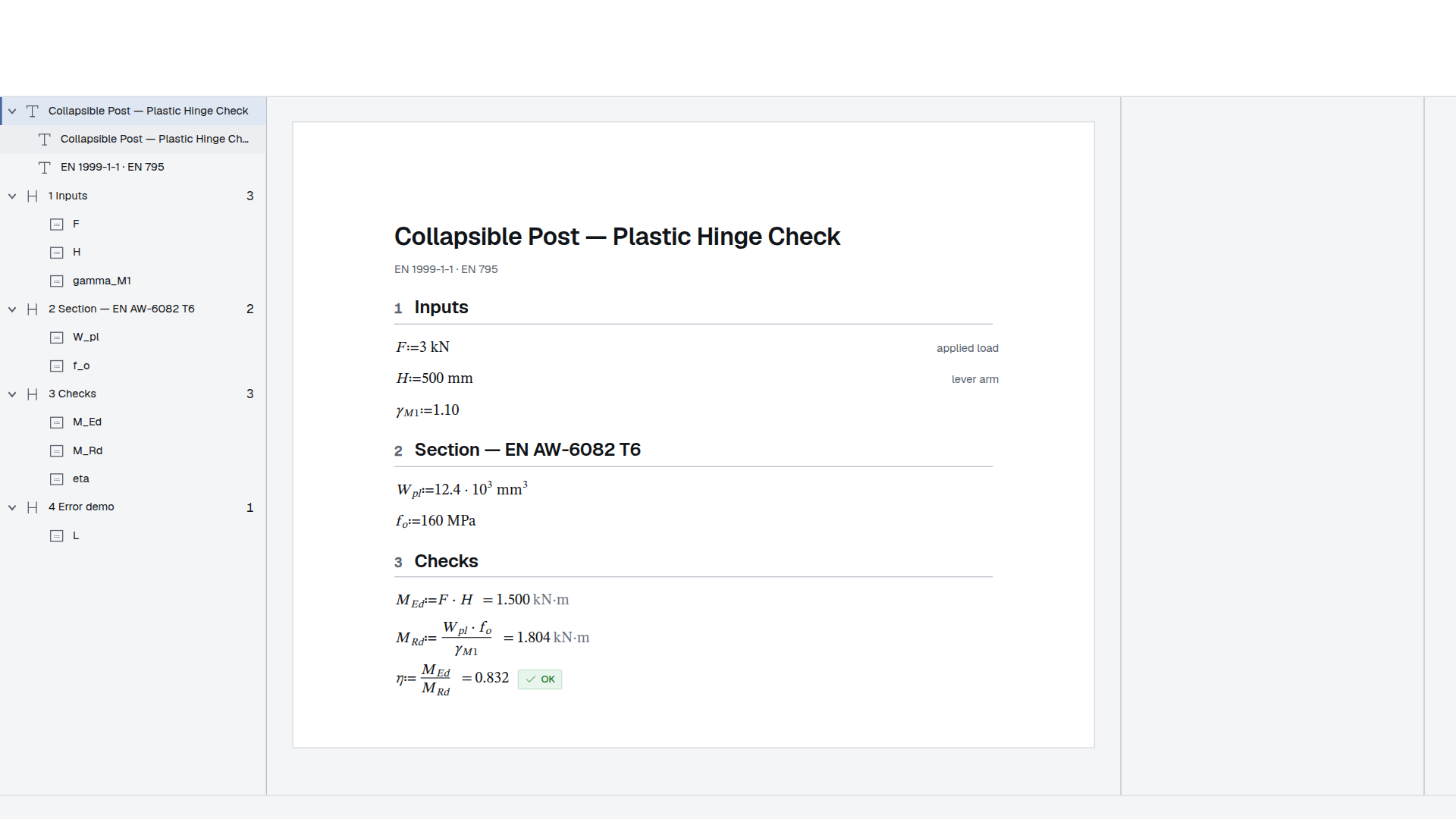
Show your working
The substitution line prints under the result, so a checker sees the numbers that went in without opening anything.
LOOP-02
Animation off — showing the result.
02
Change one thing
A sheet is a calculator the moment an input moves. Everything downstream re-inks, nothing goes stale in silence, and the logic is written where it can be read.
- Inputs and controls
- Sliders, dropdowns, toggles and steppers bound to definitions, on the sheet and in a table column.
- CC-C7
- Solve blocks
- Name the unknown and give the constraints. An exact route where a closed form exists, Newton otherwise, and the guess selects the root.
- CC-P7
- Programs
- Branches and loops in a small interpreter that never runs eval. A definition with parameters is a function the sheet calls.
- CC-P7
- The trace
- Step through a figure's program: the gutter shows each row's value, and the canvas lights the shapes that row drew.
- CC-FUI1c
- Zones
- Scope a run of blocks: keep it off paper, show it only when a condition holds, number its sections.
- CC-C6
- Checks with verdicts
- η ≤ 1.0 and the chip says so. Two-bound bands, a failed check that shows its value, and a rail that lists every check on the sheet.
- CC-C39
- Manual calculation, calc from here, a Watch panel
- Hold the sheet still while you edit, recompute from a chosen region, and watch the values you care about.
- CC-P7b
Programs, not nested IFs
A branch is a branch. The condition is visible in the sheet rather than buried in a formula bar.
LOOP-08
Animation off — showing the result.
Zones
Scope a set of blocks and reuse them. It answers a question a first visitor does not have yet.
LOOP-07
Animation off — showing the result.
03
Draw it
A figure is geometry bound to the sheet's variables. Coordinates are expressions with units, the picture is derived rather than stored, and it prints as vectors.
- Parametric figures
- Bindings flow in, measurements flow out. Change a variable and the drawing redraws; a measured length is a document symbol.
- CC-PF1
- A CAD hand
- Typed coordinate entry, eight kinds of snap, grips on every point, trim, extend and fillet, and six modify gestures — every one producing an expression, not a literal.
- CC-CAD1
- Dimensions, hatches and weld marks
- Linear, chain, ordinate and angular dimensions; ISO 128 hatches; ISO 2553 weld marks; the clearance stack a fall-arrest sheet draws.
- CC-FIG4
- The concrete section
- Faces, bars and links drawn from the section's own dimensions, hatched as the discipline hatches them.
- CC-FIG5
- Drawn once
- A definition is a routine. Place it by position, rotation and mirror; four starter profiles — CHS, RHS, UB and angle — parameterised by their dimensions.
- CC-FIG6
- Drafting furniture
- S-breaks, a north arrow, section and detail markers, and a scale bar whose words are derived from its own two points.
- CC-FIG7
- Layers
- A condition, a print flag, a default style and a lock per layer, so setting-out geometry can stay off paper.
- CC-CAD5
- DXF export
- The drawing the sheet computed, as R2000 DXF, from the figure's menu and from the standalone runner.
- CC-CAD6
- Charts
- Seven chart kinds in hand-rolled SVG, printed as vectors, with a table as a plot's input.
- CC-P4d
- Figure programs
- A drawing loop emits geometry from a program, so a pattern of n bolts is n, not a picture of six.
- CC-PF2
Parametric figures
The drawing redraws with the numbers. A section that reads at length once the figure block has been introduced.
LOOP-04
Animation off — showing the result.
04
Tabulate it
A table is a grid of expressions that carries units, publishes its columns as variables, and edits like a spreadsheet.
- Tables that compute
- Cell formulas, a format and a unit per column, a ✓/✗ column that checks itself, and columns that are document variables.
- CC-P4a
- Cell addresses and ranges
- A1-style references with $ pins, ranges, a formula bar that answers, coloured references, and a corner drag.
- CC-TBL13
- Lookups
- Bracketing and stepping lookups over a keyed column, with a typed refusal for a key off either end.
- CC-F1
- Data tables with global columns
- A schedule declared global is readable above and below itself, per column.
- CC-L46
- Typed columns
- Words, truth values and pasted values beside numbers, each column saying what it holds.
- CC-C3
- Schedules that drive instances
- A batch region drives one template sheet from a schedule's rows; the cover computes over every instance, and each prints.
- CC-BATCH2
- The STAAD bridge
- OpenSTAAD on your own Windows machine, through MCP. A landed table carries its origin stamp onto the issued page.
- CC-STAAD2
- Sized by the page
- Column widths as fractions of the content box, wrapped and hidden columns, and print parity for all of it.
- CC-TBL8b
Tables that compute
Every cell is an expression, every column carries a unit, and the utilisation column checks itself. Nine tables in this document; none of them is a picture.
LOOP-06
Animation off — showing the result.
05
Print it
The page you print is the page you wrote: one paginator, one title block and one sheet on screen, on paper and in the PDF.
- The page model
- A4, A3 and Letter, margins, explicit breaks, columns and section breaks, headers and footers edited on the page.
- CC-C5
- Title block and numbering
- A title-block template, page numbering, and a print preview that is the print.
- CC-P6
- The PDF
- Rendered on the server by driving the app's own print route, with the math font embedded and every figure a vector.
- CC-P6
- Print parity
- The canvas and the PDF agree about every page break; a zone's furniture stays off paper.
- CC-L11
- Placed PDFs
- A chosen PDF renders inside the calculation, on the paper it will print on, with pages, a margin and a border.
- CC-I1
- Projects and binders
- A binder refers to several sheets and attached PDFs, with a front page and a contents page whose rows and page numbers are derived.
- CC-PRJ4
- A binder reads its members
- A cover computes from what its members declare, with provenance chips on the canvas and a printed manifest.
- CC-XREF2
- Issue and revision
- An issued revision is locked in the database and on the wire, and its stamp prints on every page.
- CC-P6
Issue and revision
A sheet that is issued stops moving. It matters enormously to a buyer and not at all on a first visit.
LOOP-10
Animation off — showing the result.
06
Work together
Two people, one sheet, live — and the record it becomes.
- Live co-editing
- Yjs-native from the first line: presence, carets, per-character merges, every result recomputed on every machine.
- CC-P1d
- Comments and mentions
- Anchored to a region, resolved in place, with a notification for the person named.
- CC-P8
- Versions and a calc-aware diff
- A named snapshot, restored in one step, with a diff that knows which numbers moved.
- CC-P8
- Share and publish
- Roles, view-only links, and a published page that reads with no account.
- CC-P10d
- Standalone export
- One file, offline, still live: the engine and the sheet in a folder that opens from the filesystem, inputs working.
- CC-P10f-a
- The .sheaf file
- Save and open a calculation as a file; an assembly is a .sheafasm and a project a .sheafproj.
- CC-C5
- Offline drafts
- A local replica in the browser; a reconnect merges, and the status bar says which.
- CC-P9
- A blank sheet with no account
- The front door is a working sheet with the real engine. The account is the price of keeping the work, not of doing it.
- CC-P10g-b
One file, offline, still live
Send a calculation to somebody with no account and no network. The inputs still work.
LOOP-12
Animation off — showing the result.
07
Let it write
The Assistant writes a sheet from a description, extends or fills one you are editing, and reads the house's guide before it does.
- Describe it, get a sheet
- Say what you are checking; the sheet arrives written, evaluated, and open for editing.
- CC-P10i-a
- Every block family on the first turn
- Tables, figures, charts, controls, programs and solve blocks — not only mathematics — plus the paper size and the result display.
- CC-AS2
- The in-document panel
- Ask for a change to a region. Apply is one transaction on your own sheet; the server never writes a live document.
- CC-P10i-c
- The outline builder
- A brief per section, a saved outline that reopens as saved, and a sheet written from it in stages.
- CC-P10j-a
- Runs that outlive a tab
- A long generation runs on a worker; reload and the sheet is still being written.
- CC-P10j-k
- The house style and its guide
- An office's palette, paper and defaults, copied into a sheet at birth, and an authoring guide the Assistant reads on every ask.
- CC-HS4
- The MCP connector
- Seventeen tools: validate, create, evaluate, render a PDF, edit, outlines, templates and the vocabulary — for the Claude you already use.
- CC-P10e
- Documentation and a function reference
- Walkthrough frames shot from the shipped components, and one page answering what every function takes, returns and refuses.
- CC-D5